PH11 GCash QRPh Instant Deposit & Verified Wallet Cashout
Fund your wallet with ph11 gcash using a 30-second QRPh instant deposit and request a verified wallet cashout in 3 to 12 minutes. Check the ₱100 minimum limit, zero-fee schedule, and mandatory 1:1 name match rule before you transfer pesos.
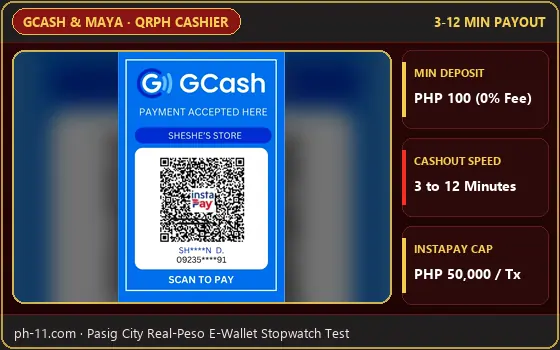
- Minimum ₱100 Deposit: Instant 15-45 sec credit via QRPh with ₱0 cashier fee.
- Fast 3-12 Min Cashout: Direct to Fully Verified 09XX GCash wallets after 1x turnover.
- 1:1 Name Match Required: GCash legal name must match your ph11 profile name.
PH11 GCash Limits, Zero-Fee Rules and ₱100 Minimum Limit Table
Checking the official ph11 gcash transaction boundaries before you open the cashier helps you avoid rejected transfers and unnecessary bank fees. Across our Pasig City stopwatch tests on Smart 5G and PLDT Fibr, GCash QRPh remained the fastest peso funding channel on the platform, outperforming traditional bank portals. You can compare how GCash stacks up against every other local channel on our parent ph11 withdrawal turnover check overview page.
| Transaction Type | Min / Max Limit (₱) | Tested Speed & Fee |
|---|---|---|
| GCash QRPh Instant Deposit | ₱100 to ₱50,000 / tx | 15 to 45 Seconds · ₱0 (0% Fee) |
| GCash Direct Express Deposit | ₱100 to ₱30,000 / tx | 30 to 90 Seconds · ₱0 (0% Fee) |
| Verified GCash Cashout | ₱100 to ₱50,000 / tx | 3 to 12 Minutes · ₱0 (0% Fee) |
| Daily Cashout Frequency | Up to 3 - 5 Requests / Day | Expandable via higher VIP tiers |
Four Mobile Steps for a 30-Second QRPh Instant Deposit on PH11
Completing a QRPh instant deposit on a single smartphone takes under 45 seconds when you use GCash's built-in Upload QR feature instead of trying to borrow a second phone to scan your screen. Most Filipino players run into expired codes because they leave the cashier screen open too long or reuse an old screenshot from yesterday.
- Select GCash QRPh & Enter Peso Amount: Open the signed-in cashier, tap Deposit, choose GCash (QRPh), and enter at least the ₱100 minimum limit (for example, ₱200 or ₱500). Always leave the promo box unchecked if you want a fast 1x raw cashout later.
- Save the Dynamic QRPh Code: Tap Generate QR. Immediately tap "Save to Gallery" or take a clean screenshot of the QRPh square. Remember that every QRPh code is single-use and expires in exactly 5 minutes.
- Upload Inside Your GCash App: Switch to your GCash app, tap the blue QR button at the bottom center of the screen, tap Upload QR in the bottom-right corner, and pick the screenshot you just took.
- Approve MPIN & Wait 3 Seconds on the Receipt: Confirm the exact peso amount, enter your 6-digit SMS OTP if prompted, and wait 3 seconds on the GCash payment receipt screen so the webhook notifies the casino server automatically.
Binding Your Number for a Fast Verified Wallet Cashout (3 to 12 Mins)
Before you can request your first verified wallet cashout, you must bind your 11-digit `09XX` GCash number and set a 6-digit Transaction PIN inside your profile's Security Center. In our Pasig City payout checks, a ₱1,200 cashout requested at 2:15 PM on a Tuesday landed in our Fully Verified GCash wallet in exactly 3 minutes and 10 seconds.
Keep in mind that your withdrawal button only unlocks once your "Remaining Required Bet" meter hits ₱0.00. If you accidentally clicked a welcome offer during deposit, check our ph11 bonus wagering rules math breakdown to see why a 20x wagering lock takes much longer to clear than a standard 1x raw deposit.
The Strict 1:1 Name Match Rule and GCash ₱100,000 Monthly Incoming Cap
Following the name match rule is non-negotiable under Bangko Sentral ng Pilipinas (BSP) anti-fraud standards. The automated payout gateway compares the legal name registered on your gaming profile against the verified name returned by G-Xchange Inc. (GCash). If you registered under a nickname or tried to cash out to your spouse's or cousin's GCash number, the system rejects the payout automatically.
Standard Fully Verified GCash accounts carry a ₱100,000 monthly incoming transfer limit across all person-to-person, bank, and merchant credits combined. If you have already received ₱85,000 in salary, remittance, or previous casino payouts this calendar month and request a ₱25,000 withdrawal, GCash will reject the incoming transfer! When your monthly cap is nearly full, bind a secondary payout channel using our ph11 cash out limits steps for Maya or local banks.
Troubleshooting Delayed QRPh Credits and Rejected PH11 Withdrawals
Even with automated QRPh rails, national InstaPay maintenance windows or Friday payday congestion (5:00 PM to 9:00 PM) can occasionally delay a ph11 gcash credit by 10 to 15 minutes. Similarly, high-volume players who cash out multiple times a day should check their ph11 vip cashback math level to see their exact daily request count and 1x cashback status.
1. Never Re-Send to an Expired QR Code: If a QRPh code fails, never manually transfer money to the merchant name shown in your transaction history.
2. Copy the 13-Digit GCash Reference Number: Open your GCash Activity inbox, copy the 13-digit Reference No. from the receipt, and paste it with a screenshot into 24/7 Live Chat for a manual ledger credit in under 5 minutes.
How do I scan the PH11 QRPh deposit code if I am playing on a single phone?
Tap 'Save Image' or take a screenshot of the QRPh code on your ph11 cashier screen. Open your GCash app, tap the 'QR' icon at the bottom center, tap 'Upload QR' from the bottom-right corner, and select the saved screenshot from your phone Gallery within 5 minutes.
Why did my ph11 gcash withdrawal bounce back to my gaming balance after 10 minutes?
There are two main causes: either your GCash account has already hit its ₱100,000 monthly incoming transfer limit for basic Fully Verified wallets, or the registered full name on your ph11 profile does not match the legal name on your GCash account 1:1.
Does PH11 charge a service fee on ₱100 GCash deposits or cashouts?
No. Both QRPh deposits starting at ₱100 and verified GCash withdrawals starting at ₱100 carry a ₱0 (0%) processing fee from the ph11 cashier.